
How to Google Merchant Account Setup- Complete Guide
Complete guide to Google Merchant Account Setup. Learn step by step how to create, optimize & grow your Google Merchant Center for better sales
If you’re running an eCommerce business, visibility is everything. You may have great products, competitive pricing, and a well-designed website—but if customers can’t find your products, sales will remain limited. That’s where google merchant account setup becomes essential.
Google Merchant Center allows you to showcase your products directly on Google Search, Shopping, and other platforms. Instead of waiting for customers to visit your website, your products appear right when they are actively searching. This creates a powerful opportunity to drive high-intent traffic.
In simple terms, it bridges the gap between your store and potential buyers. Whether you want free listings or paid ads, setting up your Google Merchant account is the first step toward scaling your online business.
What is Google Merchant Center?
Google Merchant Center is a platform where you upload and manage your product data so it can appear across Google services. This includes Google Shopping, Search results, YouTube, and even Display ads.
Think of it as a central hub. You provide details like product title, description, price, availability, and images. Google then uses this data to match your products with relevant search queries.
It works closely with Google Ads. Merchant Center stores the data, while Google Ads helps promote it. Together, they create a complete ecosystem for product marketing.
Without Merchant Center, running Shopping campaigns is not possible. That’s why it’s a foundational tool for any serious eCommerce strategy.
Key Benefits of Setting Up a Google Merchant Account
Setting up your Merchant Center account comes with several advantages that directly impact your sales and visibility. One of the biggest benefits is increased exposure. Your products can appear in Google Shopping results, which are highly visual and attract attention quickly. Customers see images, prices, and reviews before even clicking.
Another advantage is high purchase intent. Users searching on Google Shopping are usually ready to buy. This means better conversion rates compared to general website traffic.
You also get access to free product listings. Even without running ads, your products can appear organically. This is a great way to generate traffic without additional cost.
Additionally, when combined with paid campaigns, your reach expands significantly. You can target specific audiences, locations, and behaviors to maximize results.
In short, a proper google merchant account setup helps you attract the right customers at the right time.
Requirements Before Creating a Google Merchant Account
Before creating your account, you need to ensure that your website and business meet Google’s requirements. Skipping this step can lead to disapprovals or even account suspension.
First, your website must be secure. An SSL certificate (HTTPS) is mandatory. Customers need to trust your site before making a purchase.
Second, you must have clear policies. This includes privacy policy, refund policy, and terms and conditions. These pages should be easily accessible from your website.
Third, your contact information must be visible. Include your email, phone number, or business address. Transparency builds credibility.
Product data is equally important. Each product should have a title, description, price, image, and availability status. Missing or incorrect data can cause issues later.
Preparing these elements beforehand ensures a smooth setup process.
Creating Your Google Merchant Center Account
The account creation process is simple but requires attention to detail.
Start by visiting the Google Merchant Center website and signing in with your Google account. Enter your business name, country, and time zone. These details are important because they determine how your products are displayed.
Next, agree to the terms and conditions. Make sure you understand Google’s policies, as compliance is crucial.
After that, you’ll need to verify and claim your website. This step confirms that you own the website and have permission to manage its product listings.
Once completed, your basic account setup is ready. However, this is just the beginning. Proper configuration is what truly makes a difference.
Configuring Essential Account Settings
After creating your account, you need to configure important settings to ensure everything runs smoothly.
Start with your business information. Add your logo, business description, and contact details. This helps build trust with potential customers.
Next, set up shipping settings. Define your shipping rates, delivery times, and regions you serve. Clear shipping information reduces confusion and improves customer experience.
Tax settings are also important, especially if you sell in regions where tax calculation is required. You can either set it manually or automate it based on your location.
These settings may seem basic, but they play a crucial role in approval and performance.
Adding Products to Google Merchant Center
Once your account is configured, the next step is adding your products.
There are two main ways to do this. You can upload products manually or use a product feed. Manual upload works for small inventories, but it becomes inefficient as your catalog grows.
A product feed is a file that contains all your product data. This can be created using Google Sheets, XML, or API integration. Feeds allow you to update multiple products at once, saving time and effort.
Each product must include accurate information. Titles, descriptions, prices, and images should be clear and consistent.
The better your product data, the better your chances of appearing in search results.
Optimizing Product Feed for Better Performance
Uploading products is not enough. Optimization is what drives results.
Start with product titles. Use relevant keywords that match what customers are searching for. Keep them clear and descriptive. Avoid unnecessary words.
Descriptions should provide useful information while remaining easy to read. Highlight key features and benefits.
Images must be high-quality. Use clean backgrounds and ensure the product is clearly visible. Poor images can reduce click-through rates.
Also, make sure your pricing and availability are always updated. Inconsistent data can lead to disapprovals.
A well-optimized feed improves visibility, clicks, and conversions.
Fixing Common Errors and Disapprovals
Errors are common, especially for beginners—but the key is to identify and fix them quickly before they affect your performance.
Google Merchant Center includes a Diagnostics section where you can view all issues related to your products and account. These may include missing product data, policy violations, incorrect pricing, or feed errors.
Some of the most common problems include:
- Price mismatch between your website and product feed
- Missing or incorrect shipping information
- Low-quality or non-compliant images
- Incomplete product attributes (like brand, GTIN, or availability)
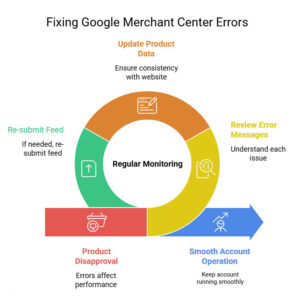
To fix these issues, carefully review each error message and follow Google’s recommendations. Update your product data, ensure consistency with your website, and re-submit your feed if needed.
Ignoring these errors can lead to product disapproval or even account suspension. That’s why regular monitoring and quick action are essential to keep your account running smoothly.
Linking Google Merchant Center with Google Ads
To run paid campaigns, you need to link your Merchant Center account with Google Ads.
This process is simple. Go to your Merchant Center settings and connect your Google Ads account using your account ID.
Once linked, you can create Shopping campaigns directly from Google Ads.
This integration allows you to promote your products to a wider audience and control your advertising budget.
Without this step, you won’t be able to run paid Shopping ads.
Advanced Features to Boost Performance
After setting up the basics, you can explore advanced features to improve your results.
Promotions allow you to highlight discounts and special offers. These can increase click-through rates and attract more customers.
Customer reviews are another powerful feature. Positive reviews build trust and influence buying decisions.
You can also use local inventory ads if you have a physical store. This helps you target nearby customers.
These features give you a competitive edge in the marketplace.
Tracking Performance and Analytics
Tracking performance is crucial for long-term success.
Google Merchant Center and Google Ads provide detailed reports on impressions, clicks, and conversions.
Focus on key metrics like click-through rate (CTR), conversion rate, and return on ad spend (ROAS). These indicators help you understand what’s working and what needs improvement.
You can also integrate Google Analytics for deeper insights into user behavior.
Data-driven decisions lead to better results over time.
Best Practices for Long-Term Success
Consistency is key when managing your Merchant Center account.
Keep your product feed updated regularly. Prices, availability, and descriptions should always match your website.
Test different product titles and images to see what performs best. Small changes can make a big difference.
Stay updated with Google’s policies. Rules can change, and staying compliant is essential.
Long-term success comes from continuous optimization and adaptation.
Common Mistakes to Avoid
Many sellers make avoidable mistakes that hurt their performance. Here are the most common ones:
- Ignoring policy guidelines
Not following Google’s rules can lead to product disapproval or even account suspension. - Poor product data quality
Incomplete or incorrect information (title, price, description, images) reduces visibility and trust. - Not updating product feed regularly
Outdated prices or stock status can cause errors and disapprovals. - Low-quality images
Blurry or unclear images decrease click-through rates and conversions. - Ignoring account diagnostics
Not checking errors and warnings allows small issues to turn into bigger problems. - Weak product titles and descriptions
Lack of proper keywords can limit your product’s reach on Google Shopping. - Incorrect shipping or tax settings
Missing or wrong details can affect user experience and lead to disapproval. - Not monitoring performance
Without tracking metrics, you miss opportunities to optimize and improve results.
Avoiding these mistakes will save time, improve performance, and keep your account safe.
Conclusion: Build a High-Converting Google Shopping Presence
Setting up a Google Merchant account is more than just a technical process—it’s a smart strategy to grow your eCommerce business. A proper google merchant account setup helps you reach customers who are actively searching and ready to buy, increasing both visibility and conversions.
However, success doesn’t come from setup alone. You need to keep optimizing your product feed, updating information, and monitoring performance regularly. Even small improvements in titles, images, or pricing can make a big difference over time.
As your business grows, you can scale your efforts by using advanced features like promotions and paid campaigns. This allows you to reach more customers and boost sales efficiently.
Start simple, stay consistent, and keep improving. With the right approach, Google Merchant Center can become a powerful and reliable channel for long-term eCommerce growth.
With the right strategy, clear execution, and ongoing improvements, Google Merchant Center can become one of the most powerful and reliable sales channels for your business—driving consistent traffic, higher conversions, and sustainable long-term growth.